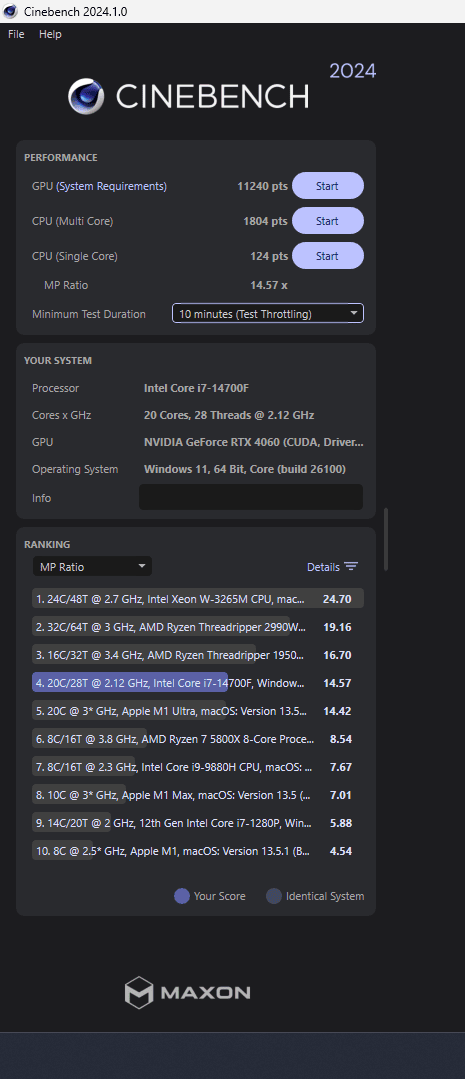
| Date | 2025-10-08 22:41:42 |
| User | RedxVisions |
| Country | 🇨🇦 Canada |
| CPU | Intel Core i7 14700F |
| Single Core | 124 |
| Multi Core | 1804 |
| Overclocked | Yes |
| Comment | I'm new to all of this so I can't really confirm everything I say but I will explain what I did.
I wanted to play a specific game at higher FPS and didn't want to spend money to do that. I was CPU bound so I did some research on ways to optimize my CPU. I then learned how to reduce the voltage on my CPU which from what I understand, has been reduced by 0.130V (I feel like this is a lot but that is the value in the Dynamic Vcore tab in my BIOS). I then learned how to increase PL1 and PL2 and managed to get it up to 180 watts for this specific benchmark. I think my base was around 1250 give or take, so seeing 1800 feels great. Oh and this was also done on an Acer Nitro pre-built gaming PC, completely stock other than a GPU overclock which is super basic. I originally settled at 150 watts on PL1 and PL2 because anything after that resulted in lower scores and sometime thermal throttling. I didn't understand why at the time but today I figured it out. Upon looking at HWiNFO and trying to learn what everything meant, I finally figured out what "VR VCC Temperature (SVID)" meant. Turns out the VRM on this basic Gigabyte motherboard doesn't really expect you to crank the power up that high. So, although my chip wasn't thermal throttling itself, it was causing the VRM to hit its limit at 100 degrees, lowering my clock speed. The solution was simple. I ripped a fan out of my mothers old computer from like 1999 or something like that (maybe 60mm fan or something) and mounted it inside the top of my case right above the VRM. Next thing you know, I'm pushing this pre-built to 180 watts with my VRM settling at about 90 degrees. It also worked great for the purpose of increasing FPS in my game, in the same test scene in the game I've gained anywhere from 60-80FPS, and that was only on 150 watts. I'm going to go test my game right after I submit this, I hope its even better than before! So yeah to replicate this, all one would need is an Acer Nitro N60-640 and a cheap fan from an old computer to cool the VRM. The stock cooler in this PC is rated for 170 watts so the CPU temps aren't as bad so long as you're under-volting (or maybe I didn't even undervolt properly and I have more to gain?). Either way, the limiting factor here was the VRM design, but with a little creativity its easily circumvented, I'm also certain someone could do better than this with a larger fan or more creative cooling solution for the VRM on this pre-built system. |